Showing posts with label cms. Show all posts

Sep 12, 2013

Developing a CMS the right way

Hey guys and welcome to my blog again.

This week I'd like to address an issue real quickly - Which things to take into account before developing a CMS. These things apply to a self-built CMS for your product, for your in-house company or as a freelance. In all cases you should aspire for the best possible product done in the shortest time.

So here are the tips:


1. Understanding the needs - it is not enough to get a list of demands or even an elaborated PRD (we will touch that next). If you don't understand the true needs, how the site should visually appear (even if you do back-end work only), what purpose does it serve and what is its business line, you increase your chances of inadequacy. 

2. Specific per-page-type PRD including a mock up - yes with clients it could be a little rougher as they don't want to work, but explaining your client intelligently that without that you might end up working twice the time and he will pay twice the $ can help. Obviously if you don't get a clear understanding of what each page should consist in terms of elements and data, you wouldn't be able to make it.

3. Keep flexible - even if you know the page types top to bottom and you hard-coded yourself a wonderful page template, you are doing it wrong. Keeping a certain flexibility (element shows on page yes/no, modular building blocks per page that are easily replaceable even by admin, etc.) can help you make adjustments if your client needs them very quickly. It can also help him get MORE than what he wanted and keep him happy. When you're building the CMS for internal needs that is even more important, you don't tie the business to the technical limitations of the CMS.

4. Don't build from scratch - well this is sort of high level programming 101 thing, but still I see too many people make this mistake and create their own features that are already in existence, or even build it from the ground up (I've seen people do it without a framework even).

5. Secure your CMS - even if this is not a demand from client or in-house, keep CMS'es secure. If the site will pick up, it will get some crackers trying to brute force it or do some other small nasty things. 
I like securing CMS with IP login limitations. If there are several people who should work on it that ain't physically sitting together, just make a proxy or a VPN. That doesn't eliminate the need for a proper password, by the way.

If you need EXTRA security, processing payment etc. - it's fine to skip clause 4 and build shit (wisely) from scratch. You should know that ready-made plugins/ features / CMS'es have their vulnerabilities, and not only that - they are readily available for any 14 y/o online terrorist on any forum.

This was real quick and I will add a bunch more tips over the course of time.

Peace.

Nov 1, 2012

Php tutorial, Login script with Jquery

View Demo Download
On today's tutorial were gonna build an Php and Jquery login script.
To make it more easy i separated the article in 4 parts:
  1. Html Form
  2. Adding Php
  3. Jquery checks
  4. Final code
First of all we are goind to make the html form which it is well designed in css3
<html>
<head>
<title>Php And Jquery Login tutorial</title>
<link rel="stylesheet" href="style.css" type="text/css">
<script src="jquery-1.8.2.min.js" type="text/javascript"></script>
<script src="code.js" type="text/javascript"></script>
</head>
<body>
<div id="alert">Please type something.</div>
<div id="box">

<form action="submit.php" method="post" id="ContactForm">
<input type="text" name="user" value="Username.." id="user"><br />
<input type="password" name="pass" value="passwd" id="pass"><br />
<input type="submit" value="Login" class="button">
<div class="form_result"> </div>
</form>

</div>
</body>
</html>


The php backend, just a simple login script for demonstration

<?php
if(isset($_POST['user']) && !empty($_POST['pass'])){
$uid = "mikel";
$pid = "thecodertips";
if($_POST['user'] != $uid){
die("Wrong username..");
}
if($_POST['pass'] != $pid){
die("Wrong password..");
}
echo 'Welcome.';
}
?>


Then the css part
input{
outline: none; /* removes google chrome outline */
}

#box{ /* the login box design */
width: 190px;
background-image: -webkit-linear-gradient(top, rgba(252,252,252,1) 0%,rgba(243,243,243,1) 100%);
background-image:    -moz-linear-gradient(top, rgba(252,252,252,1) 0%,rgba(243,243,243,1) 100%);
background-image:     -ms-linear-gradient(top, rgba(252,252,252,1) 0%,rgba(243,243,243,1) 100%);
background-image:      -o-linear-gradient(top, rgba(252,252,252,1) 0%,rgba(243,243,243,1) 100%);
background-image:         linear-gradient(top, rgba(252,252,252,1) 0%,rgba(243,243,243,1) 100%);
-webkit-box-shadow: 0px 1px 2px 0px rgba(0,0,0,0.15), 0px 1px 2px 0px rgba(0,0,0,0.15), 0px -2px 3px 0px rgba(255,255,255,1)inset, 0px -16px 0px 0px rgba(237,237,237,1)inset;
-moz-box-shadow: 0px 1px 2px 0px rgba(0,0,0,0.15), 0px 1px 2px 0px rgba(0,0,0,0.15), 0px -2px 3px 0px rgba(255,255,255,1)inset, 0px -16px 0px 0px rgba(237,237,237,1)inset;
box-shadow: 0px 1px 2px 0px rgba(0,0,0,0.15), 0px 1px 2px 0px rgba(0,0,0,0.15), 0px -2px 3px 0px rgba(255,255,255,1)inset, 0px -16px 0px 0px rgba(237,237,237,1)inset;
border: solid 1px #5E5E5E;
border-color: #5E5E5E #888888 #696969 #888888;
-webkit-border-radius: 16px;
-moz-border-radius: 16px;
border-radius: 16px;
padding: 0px 20px 0px 20px;
display: inline-block;
font-size: 15px;
line-height: 32px;
color: rgba(51,51,51,1);
}

#user, #pass{
padding: 8px;
color:gray;
margin: 10px;
-webkit-box-shadow: 0px 1px 2px 0px rgba(0,0,0,0.15), 0px 1px 2px 0px rgba(0,0,0,0.15), 0px -2px 3px 0px rgba(255,255,255,1)inset, 0px -16px 0px 0px rgba(237,237,237,1)inset;
-moz-box-shadow: 0px 1px 2px 0px rgba(0,0,0,0.15), 0px 1px 2px 0px rgba(0,0,0,0.15), 0px -2px 3px 0px rgba(255,255,255,1)inset, 0px -16px 0px 0px rgba(237,237,237,1)inset;
box-shadow: 0px 1px 2px 0px rgba(0,0,0,0.15), 0px 1px 2px 0px rgba(0,0,0,0.15), 0px -2px 3px 0px rgba(255,255,255,1)inset, 0px -16px 0px 0px rgba(237,237,237,1)inset;
border: solid 1px #5E5E5E;
border-color: #5E5E5E #888888 #696969 #888888;
-webkit-border-radius: 16px;
-moz-border-radius: 16px;
border-radius: 16px;
}

#user:hover, #pass:hover{
border:1px solid #00BFFF;
color: black;
}

.button {
background-image:-webkit-linear-gradient(top, rgba(252,252,252,1) 0%,rgba(243,243,243,1) 100%);
background-image:-moz-linear-gradient(top, rgba(252,252,252,1) 0%,rgba(243,243,243,1) 100%);
background-image:-ms-linear-gradient(top, rgba(252,252,252,1) 0%,rgba(243,243,243,1) 100%);
background-image:-o-linear-gradient(top, rgba(252,252,252,1) 0%,rgba(243,243,243,1) 100%);
background-image:linear-gradient(top, rgba(252,252,252,1) 0%,rgba(243,243,243,1) 100%);
-webkit-box-shadow: 0px 1px 2px 0px rgba(0,0,0,0.15), 0px 1px 2px 0px rgba(0,0,0,0.15), 0px -2px 3px 0px rgba(255,255,255,1)inset, 0px -16px 0px 0px rgba(237,237,237,1)inset;
-moz-box-shadow: 0px 1px 2px 0px rgba(0,0,0,0.15), 0px 1px 2px 0px rgba(0,0,0,0.15), 0px -2px 3px 0px rgba(255,255,255,1)inset, 0px -16px 0px 0px rgba(237,237,237,1)inset;
box-shadow: 0px 1px 2px 0px rgba(0,0,0,0.15), 0px 1px 2px 0px rgba(0,0,0,0.15), 0px -2px 3px 0px rgba(255,255,255,1)inset, 0px -16px 0px 0px rgba(237,237,237,1)inset;
border: solid 1px #5E5E5E;
border-color: #5E5E5E #888888 #696969 #888888;
-webkit-border-radius: 16px;
-moz-border-radius: 16px;
border-radius: 16px;
padding: 0px 20px 0px 20px;
display: inline-block;
font-size: 15px;
line-height: 32px;
color: rgba(51,51,51,1);
margin-left: 25%;
}
.button:active {
background-image: -webkit-linear-gradient(top, rgba(167,199,225,1) 0%,rgba(124,176,222,1) 100%);
background-image:    -moz-linear-gradient(top, rgba(167,199,225,1) 0%,rgba(124,176,222,1) 100%);
background-image:     -ms-linear-gradient(top, rgba(167,199,225,1) 0%,rgba(124,176,222,1) 100%);
background-image:      -o-linear-gradient(top, rgba(167,199,225,1) 0%,rgba(124,176,222,1) 100%);
background-image:         linear-gradient(top, rgba(167,199,225,1) 0%,rgba(124,176,222,1) 100%);
-webkit-box-shadow: 0px 1px 2px 0px rgba(0,0,0,0.15), 0px 1px 2px 0px rgba(0,0,0,0.15), 0px -2px 3px 0px rgba(182,226,244,1)inset, 0px -16px 0px 0px rgba(99,165,219,1)inset;
-moz-box-shadow: 0px 1px 2px 0px rgba(0,0,0,0.15), 0px 1px 2px 0px rgba(0,0,0,0.15), 0px -2px 3px 0px rgba(182,226,244,1)inset, 0px -16px 0px 0px rgba(99,165,219,1)inset;
box-shadow: 0px 1px 2px 0px rgba(0,0,0,0.15), 0px 1px 2px 0px rgba(0,0,0,0.15), 0px -2px 3px 0px rgba(182,226,244,1)inset, 0px -16px 0px 0px rgba(99,165,219,1)inset;
border: solid 1px #323D9F;
border-color: #323D9F #3365B4 #3365B4 #3365B4;
}

#alert{ /* alert box */
margin-left: 80%;
width: 200px;
background: #333;
box-shadow: inset 0 -1px 0 rgba(255,255,255,.4);
border: 1px solid;
color: #fff;
padding: 15px;
position: fixed;
_position: absolute;
text-shadow: 0 1px 0 rgba(0,0,0,.5);
animation: animate-bg 5s linear infinite;
-webkit-border-radius: 16px;
-moz-border-radius: 16px;
border-radius: 16px;
text-align: center;
font-weight: bold;
}


Here comes the jquery part, i added some validations and a post method handled by php
$(document).ready(function(){
// hide alert boxes

$('#alert').hide();

// empty() function used when there is nothing entered


   // lets declare the variables for easier usage
 
   var user = $('#user');
   var pass = $('#pass');
   var button = $('.button');
 
   // checking if there is nothing submitted
 
    $(button).click(function(){

if(user.val().length < 3){
$('#alert').fadeIn();
return false;
}
if(pass.val().length < 3){
$('#alert').fadeIn();
return false;
}

$.ajax({type:'POST', url: 'submit.php', data:$('#ContactForm').serialize(), success: function(response) {
    $('#ContactForm').find('.form_result').html(response);
}});

return false;

   });
 
 });


NOTE! The php script contains security holes, it is used just as an example for the tutorial.

Sep 29, 2012

Mod rewrite tutorial. Creating seo frendly urls in php

mod rewrite

Hello dear readers.
In this tutorial i will explain in deepth how to make your url's beautiful and better for seo.

Benefits of mod_rewrite:

1) they are beautiful
Lets take an example:
Non rewrited url:
http://facebook.com/profile.php?id=12324231
Rewrited url:
http://facebook.com/PhpTutorials
Cool isnt it ?
2) Security
mod_rewrite is build in security
You can use some kind of filters who allow only 0-9 or a-z etc.. by not allowing dangerous charachters

Lets move on

To make mod_rewrite work we must go to apache http.conf and add this line:
LoadModule rewrite_module modules/mod_rewrite.so Then restart apache.
Now at root open or create .htaccess if you havent it
Lets for example rewrite the profile.php url:
RewriteEngine On
RewriteBase /
RewriteRule ^profile/([a-zA-Z0-9-!./]+).html$ profile.php?id=$1

Thats it, you can now integrate this rule with php scripts and here it is a tutorial

Aug 1, 2012

Php Mysql blog tutorial, creating a simple and secured blog

php mysql blog

On today's tutorial we will talk about creating a blog on php and mysql

Table of contest:
1. Connecting to mysql database
2. Creating mysql tables
3. Coding the blog

              Download

Connecting to mysql database is simple, in just few lines of code

Before we start i suggest you read Php Mysql posting to database for better understanding of mysql.

<?php
// connecting to host
mysql_connect("host", "user", "password"); // replace this with your data
mysql_select_db("your_database"); // database name here
?>


Creating database, tables and columns
Now let's build the mysql table.
First build a database if you haven't, and dont forget to edit the connection details at the top.
Click on databases
php mysql blog
Set a name to it and click create.
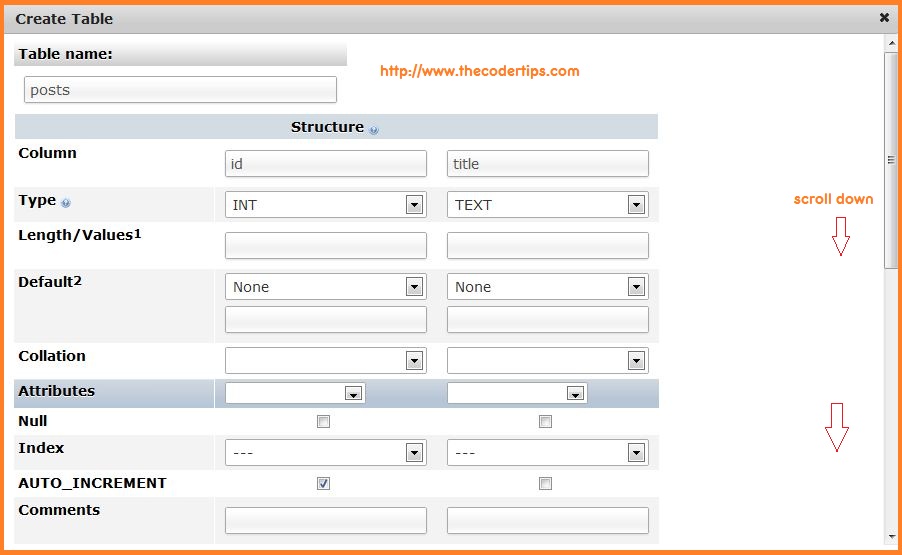
Now we must build the tables:
mysql create tables
Click 'go', a new table will popup, complete those fields like in the pocture below:
Scroll down and click save.
Last one, click on posts and insert tab at top, write something to title, and id live empty.

Now lets continue coding the blog

<?php
// connecting to host
mysql_connect("host", "user", "password"); // replace this with your data
mysql_select_db("your_database"); // database name here

// lets build a blog
if(isset($_GET['post'])){
$post = $_GET['post'];

// first of all we will check string length
if(strlen($post) > 11){ // if post id is bigger than 11 charachters
die('Blog post nof found.');
}
// now we will make sure that the post id is numeric and this is a nice security method
if(is_numeric($post)){ // is numeric allows numbers only
$post = (int)$post; // and the int function, which replace every
// string to its correspoing number

// for the tutorial im gonna add mysql_real_escape_string
// but is not really needed in this case
$post = mysql_real_escape_string($post); // final sqli defense

// final part
$query = mysql_query("SELECT title FROM posts WHERE id=$post LIMIT 1");
while($row = mysql_fetch_array($query)){
echo $row['title'];
}

}
else{ // if post is not numeric then
die('Blog post nof found.'); // post does not exist
}

}
else{
// if post is not submitted display them all
$query = mysql_query("SELECT title, id FROM posts");
while($row = mysql_fetch_array($query)){
echo $row['title'];
echo $row['id'];
echo '<a href="?post='.$id.'">'.$title.'</a><br>';
}
}
?>
Few last tips!

I used LIMIT 1 on the first mysql query.
That's done for 2 main pruposes:
1. we are only displaying 1 result
2. it's a nice speed optinization for mysql
To display blog posts by newest ones replace


SELECT title, id FROM posts
with
SELECT title, id FROM posts ORDER BY id DESC
It's a simple blog who does the work.
If you want to learn more about sql injection we suggest Sql Injection prevention tutorial